Deciding on a return: approve, reject, flag or cancel
How to read the return card, what each action does, and what the customer is told.
Click any row on the Returns page and the return opens as a card over the list. It's laid out so you can decide without clicking around.
Reading the card
The money strip at the top shows what's coming back, what's going out, what you'll refund and any refund you avoided because the shopper took credit or an exchange. Under it is one plain sentence with the net effect, for example "No cash out. £42.00 credit liability on receipt."
The items are grouped under Returning, Exchanging and Added, each with its photo, the reason and anything the customer wrote. If an offer applied, such as a credit bonus, a line under the item says so.
The customer. If someone returns much more than your average customer, the card marks them medium or high risk. Click the marker to see their return rate, how many of their orders have come back, and how much you've refunded them to date.
Yoyo's recommendation, if your automation is on Suggest, with the reasons behind it and the rules that matched.
Shipping shows the label and tracking. If there's no label yet, the card says so and offers Generate label.
Notes. Type an internal note and press Enter. Only your team sees notes.
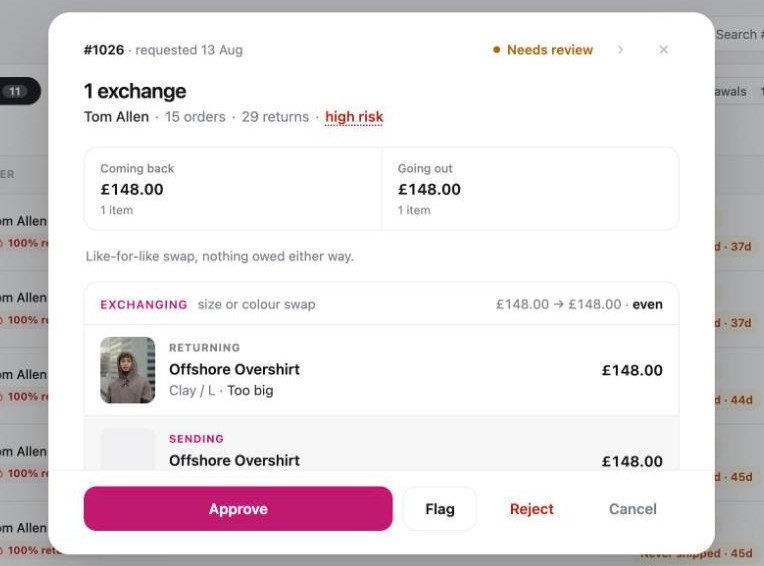
The four actions
Approve. Accepts the return. The customer is emailed, their label is created and sent if they need one, the refund or store credit is issued in Shopify, and any exchange item is released to ship.
Reject. Turns it down. You have to pick a reason, and you can add a message. The customer keeps the items and gets an email with your reason. If they'd already paid for anything in the portal, such as a price difference, that money is refunded to them.
Flag. Keeps the return open and marks it so that you or a colleague come back to it. Choose a reason, such as "Waiting on photos from customer" or "Check condition on receipt before credit", and add details for your team. The customer isn't told.
Cancel. Withdraws the request, usually because the customer changed their mind. The return is cancelled in Shopify too, the customer keeps the items, and they get an email confirming it. A cancelled return doesn't count against the customer's return history. A reason is required and is kept in the history.
If you click the wrong thing, an Undo link appears for a few seconds after each decision.
Returns Yoyo approved for you
If a return was approved automatically, the card says Approved automatically and names the rule or setting that did it. You can still flag or cancel it.
EU withdrawals
A statutory EU withdrawal can't be rejected, so the card has no Reject button. It shows the refund deadline instead. See Right of withdrawal (EU).
Good to know
- Use the arrows on the card to go to the previous or next return without closing it.
- Every action is recorded in the return's history with the time.
- If you'd rather see the item before money leaves your account, don't approve straight away. Flag it with "Check condition on receipt before credit" and approve once it has arrived.