Write a rule in plain English
Type an exception the way you'd say it and Yoyo turns it into a working rule for you to check.
You don't have to build rules from dropdowns. In the Rules section of Return Rules there's a text box. Type the exception the way you'd explain it to a new member of staff, and press Enter.
Some examples that work well:
- "Don't allow returns on items marked final sale"
- "VIP customers get free returns"
- "Send orders over £300 to review"
- "Anything reported as damaged needs a photo"
- "Customers in Norway can only have store credit"
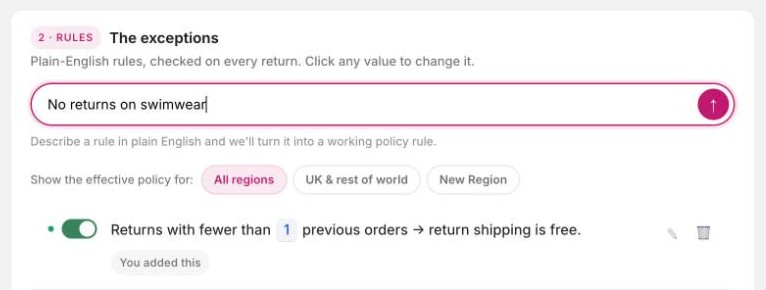
What happens next
Yoyo drafts the rule
You'll see We'll add this rule: followed by the rule written out as a sentence. Nothing is saved yet.
Answer a question, if there is one
If what you typed could mean two things, Yoyo asks one question under One thing to clear up. It won't guess.
Check it and save
Read the sentence. Click any highlighted value to change it, then click Save. If you typed several rules at once you get a draft for each, and you can keep some and discard the rest.
Rules that need judgment
Some things can't be measured. "Refuse items that are clearly worn" is a good example: no number or tag describes it. For rules like this you'll see the note We'll check this with AI on each return. Yoyo reads each return against your wording, looks at the photos and the customer's description, and explains its reasoning every time.
These are listed as Judgment rules under Automation, and each has its own Manual, Suggest or Auto setting. New ones start on Suggest, so you see the reasoning and make the call yourself. See Automation.
Tips
- Say who or what the rule applies to. "No returns on swimwear" is clearer than "be stricter on hygiene items".
- One rule per sentence is easiest to check afterwards.
- Use the tags you already have in Shopify. If you say "final sale", tag those products
final saleor edit the rule to match the tag you use. - If Yoyo can't make sense of a sentence, try naming the customer group, product or amount more plainly.