Upsell offers and the activity log
Offer add-ons on the confirmation page while the order can still be changed, show a free-shipping progress bar, and review every edit customers make.
While an order is inside its edit window, it can still be added to. That makes the confirmation page a good place for one or two well-chosen extras: they ship in the same parcel, so there's no extra postage for the customer.
Upsell offers
Go to Order Editing → Upsell offers and click New upsell offer. Pick the product, write a short headline, and set a priority. Offers with a higher priority are shown first.
Then make sure Confirmation-page offers is switched on under Order Editing → Settings → Revenue add-ons.
Keep the list short. A pair of socks next to a pair of trainers works. Twelve unrelated products doesn't.
These offers are separate from the ones in your returns portal. Portal offers live on the Retention page.
Free-shipping progress
Also under Revenue add-ons. Set your free shipping threshold, and customers just under it see "You're £8 away from free shipping" with a progress bar. The settings page shows a preview of what a customer would see.
The dashboard
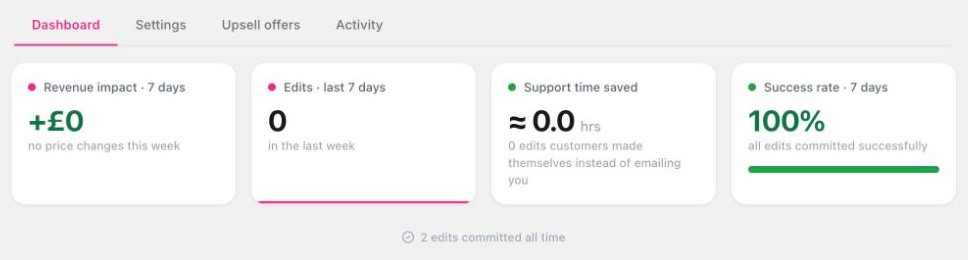
Order Editing → Dashboard shows the last 7 days:
- Revenue impact. Money added through upsells and upgrades, less anything given back.
- Edits. How many changes customers made, compared with the week before.
- Support time saved. An estimate, based on about 7 minutes for each ticket you didn't have to answer.
- Success rate. Edits that went through. Click view details if any failed.
- Upsell performance. How many customers saw an offer, clicked it, accepted and paid. The best seller is marked Top performer.
The activity log
Order Editing → Activity lists every edit with the customer, the order, the price impact and a before-and-after. Click a row for the full timeline.
Use the Needs attention filter to find edits that didn't complete, usually because a payment failed. Those orders are left as they were.
Good to know
- If a customer adds an item and doesn't pay, Undo unpaid add-ons removes it when the window closes.
- The log is useful when a customer says "I changed my address". You can see exactly what they changed and when.