WhatsApp notifications
Send return updates by WhatsApp to customers who opt in, using your own WhatsApp Business number.
In some markets, and the Gulf is the obvious one, customers read WhatsApp long before they read email. Yoyo can send return updates there too. WhatsApp messages go out in addition to email. They never replace it.
What you need
A WhatsApp Business number with one of the providers Yoyo supports: Twilio, Meta Cloud API (direct) or Unifonic. You'll need the API credentials from that provider and the phone number that messages are sent from.
Connect
Open WhatsApp settings
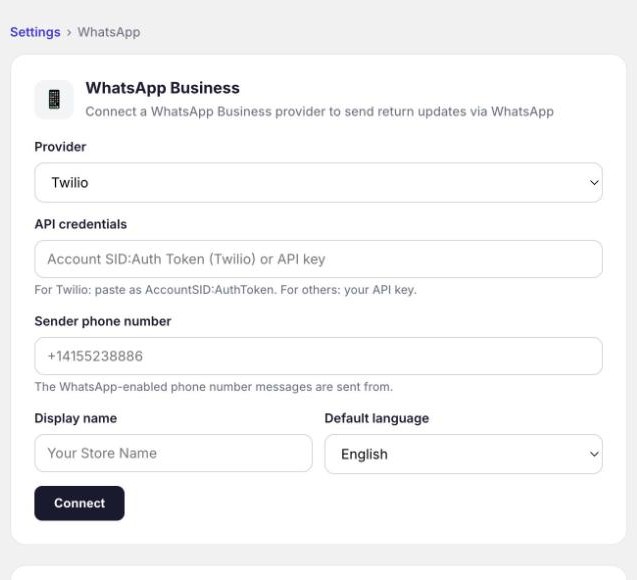
Go to Settings → WhatsApp.
Choose your provider and enter your details
Pick the provider and paste your API credentials. For Twilio, paste them as AccountSID:AuthToken. For the others, paste your API key. Add the sender phone number, your display name and a default language (English or Arabic).
Click Connect, then Enable
Once connected, turn on WhatsApp notifications. You can Pause them at any time without disconnecting.
How customers opt in
When a customer submits a return, the portal shows a tick box: "Send me return updates on WhatsApp". Only customers who tick it, and who have a phone number on their order, get messages. There's nothing for you to manage.
Customers can reply STOP to unsubscribe, or status to get the current state of their return.
The messages
| Stage | Message |
|---|---|
| Request | Return Submitted, Return Approved, Return Denied |
| Shipping | Label Ready, Package Picked Up, Shipment Reminder (a label was created but nothing has been sent) |
| Resolution | Refund Issued, Store Credit Issued, Exchange Shipped, Payment Required (with a link to pay an exchange balance) |
Each has its own switch under Return journey messages.
The wording is fixed. WhatsApp only allows business messages that use templates it has approved in advance, so Yoyo uses pre-approved templates in English and Arabic. Your store name and the details of the return are filled in.
Good to know
- Your provider charges you per message at their usual rates. Yoyo adds nothing.
- The card shows how many messages have been sent.
- If messages stop arriving, check with your provider first. An expired token or an unpaid balance on their side is the usual cause.