Intelligence: what your returns are telling you
The numbers on the Intelligence page, asking questions in plain English, product fixes you can apply in a click, and the finance view.
Every return is a small piece of feedback. One on its own doesn't tell you much. Fifty returns of the same dress for "runs small" tells you to fix the size chart. The Intelligence page reads your returns so you don't have to go through them one at a time.
The numbers at the top
Returns this month, total refunded, average refund, your top return reason, the share of returns approved without you, and your save rate, which is the share of customers you kept through an exchange or an offer when they'd otherwise have taken a refund.
Below that are your return reasons, an 8-week trend of return volume, and If you do one thing this week, which is the single change Yoyo thinks would help most.
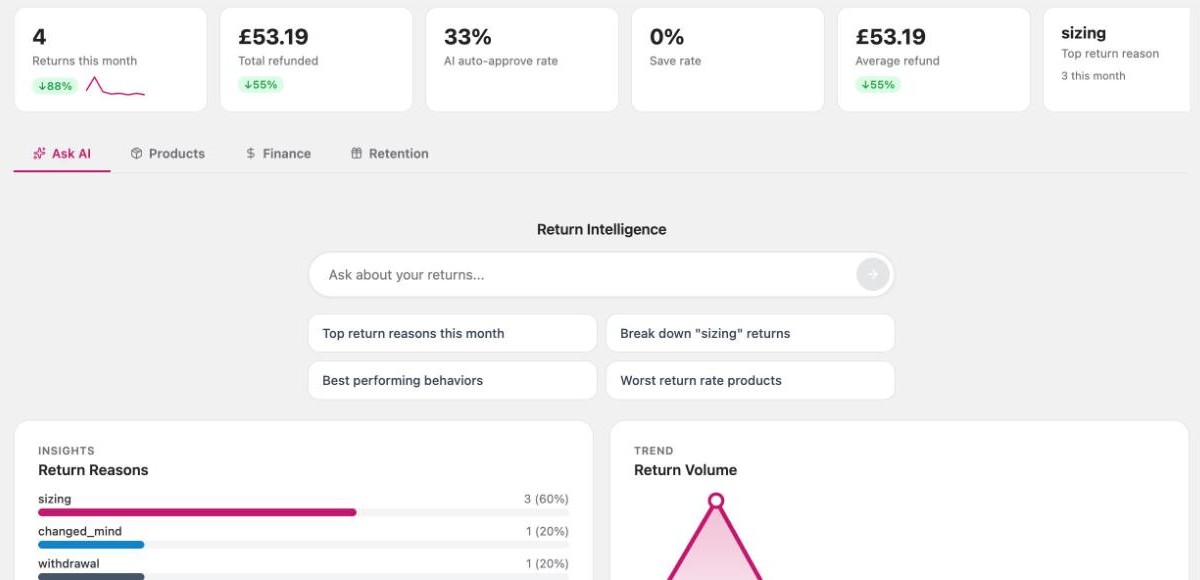
Ask AI
Type a question, such as:
- "Which products have the worst return rate?"
- "Why are people returning the linen shirt?"
- "How much did we refund to customers in Norway last month?"
The answer comes from your own returns data. Ask a follow-up to dig further, and click Visualise to see it as a chart.
Products
This tab lists the products costing you the most in returns. It flags new products with an unusual pattern early, before the numbers get big.
For each product Yoyo says what it thinks is going on and suggests a fix:
| Fix | What it does |
|---|---|
| Fix photos & description | Yoyo drafts changes to the listing. You see the current text and the new text side by side, and Apply to Shopify updates the product. |
| Offer exchange first | The portal offers an exchange on this product before any refund. |
| Store-credit-only returns | Returns of this product are paid as store credit. |
| Make final sale | The product can no longer be returned. |
| Draft supplier note / Draft packaging note | Yoyo writes the email for you to copy and send. |
The three portal options take effect straight away and you can undo them at any time. If you fixed something another way, click I did this myself. Either way Yoyo logs the change, compares the following weeks with the weeks before, and tells you whether it worked.
Products you've made final sale or store-credit-only are also listed at the bottom of Return Rules, so you can see everything affecting a return in one place.
Finance
The Finance tab is for your bookkeeper. It shows payments collected on exchanges and whether each has synced to Shopify, store credit issued, and a sales adjustment figure, because exchanges can inflate your Shopify sales report. Export CSV downloads it all.
There's also a carrier table showing shipments, delivery rate and issue rate per carrier.
Good to know
- A new store will see "No returns yet" here. The page fills in as returns arrive.
- A summary is emailed weekly, on Mondays at 8am.
- Yoyo only changes a product listing when you click Apply.