Plans and your free trial
The four plans, how the 14-day trial works, and how to switch or cancel.
Yoyo has four plans. The main difference between them is how many returns are included.
| Plan | Price | Returns included | Extra returns |
|---|---|---|---|
| Launch | $19 a month | 20 a month | $0.50 each |
| Starter | $49 a month | 5,000 a year | $0.40 each |
| Growth | $99 a month | 5,000 a year | $0.40 each |
| Pro | $199 a month | 5,000 a year | $0.40 each |
Prices are in US dollars because that's how Shopify bills apps. The pricing page lists what each plan includes.
If you're not sure, start small. Moving up takes one click, and during setup Yoyo suggests a plan based on your order volume.
The free trial
Every plan starts with a 14-day free trial. You approve the plan on Shopify's screen and pay nothing until the trial ends. No card details are given to Yoyo, because billing runs through your Shopify account.
If you uninstall and come back later, your trial carries on from where it was. It doesn't start again.
See or change your plan
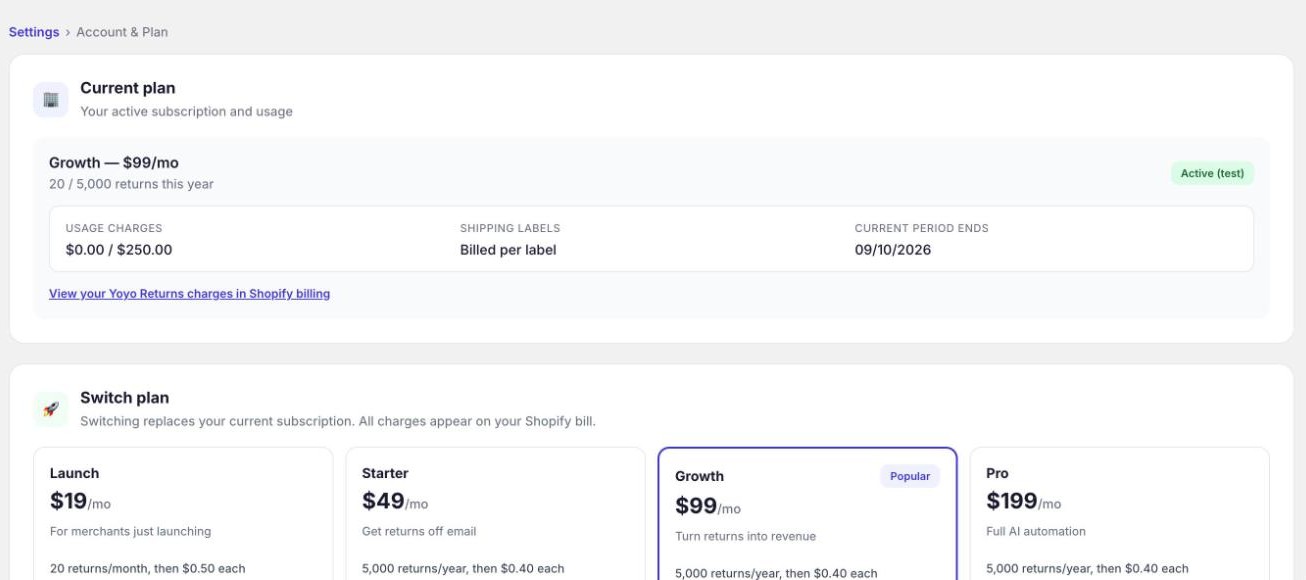
Go to Settings → Account & Plan. The top card shows your plan, how many returns you've used in the current period, and when the period ends.
To change, click Switch to on another plan and approve it in Shopify. The new plan replaces the old one. Shopify works out any part-month difference.
Cancelling
On the same page, click cancel your plan. Billing stops straight away.
Here's what happens after that:
- The Yoyo admin locks until you pick a plan again.
- Your customer portal keeps running. Shoppers are never blocked.
- Your settings, rules and return history are kept. If you choose a plan later, you pick up where you left off.
Uninstalling the app from Shopify also ends your plan.
If an approval didn't go through
If the Shopify approval screen was closed, or the charge was declined, nothing was billed. Open Yoyo and pick a plan again. If Shopify has paused app charges on your store, sort that out in your Shopify billing settings first, then approve a plan.