UK return labels (Royal Mail, Evri, DPD)
Switch on prepaid UK return labels in one click, set your monthly cap, or connect your own Sendcloud account to use your own rates.
For UK returns you don't need a carrier contract. Yoyo has a shipping account with Royal Mail, Evri and DPD that you can use, and you only pay for labels your customers use.
Switch labels on
Open Shipping & Carriers
Go to Settings → Shipping & Carriers.
Click Activate labels
The Activate prepaid return labels card lists the carriers you picked during setup. One click turns them on. You don't need to enter any codes or logins.
Check your carriers
Under Carriers, each one has a switch. Turn off any you don't want to offer, and use Make default to choose the one suggested first.
Set your cap
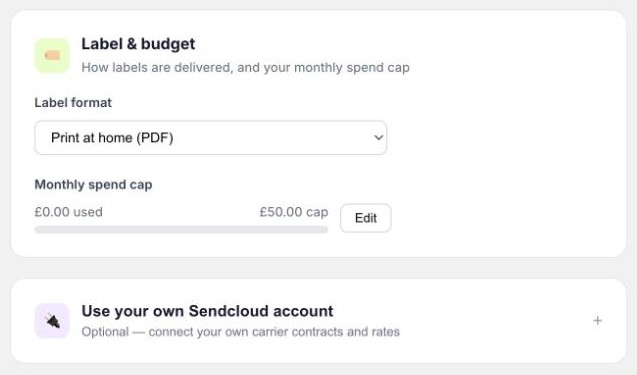
Under Label & budget, set the Monthly spend cap. It starts at £50. The bar shows how much you've used this month.
What it costs
| Carrier | Service | Price | Usual transit time |
|---|---|---|---|
| Royal Mail | Tracked 48 | From £2.38 | 3 to 5 days |
| Evri | Standard | From £2.95 | 3 to 5 days |
| DPD | Drop off | From £6.07 | 2 to 3 days |
These are the carrier's prices with nothing added by us. Labels are charged to your Shopify bill, alongside your Yoyo plan. If you hit your cap, Yoyo stops creating labels until next month or until you raise the cap. Returns are still accepted, but they show "No label" on your Returns page and the customer is told their label will follow by email. Raise the cap, then click Generate label on each one. It's worth setting the cap with some headroom.
Paper label or QR code
Under Label format choose Print at home (PDF), QR code, or Let customer choose. With a QR code the customer shows their phone at the drop-off point and the shop prints the label. QR codes work with Evri and DPD. Royal Mail returns use a printed label.
Using your own Sendcloud account
If you already have Sendcloud with your own carrier contracts, you can use those rates.
Get your API key
In Sendcloud, go to Settings → Integrations and create an API integration. Copy the key.
Connect it
In Yoyo, open Use your own Sendcloud account at the bottom of Shipping & Carriers, paste the key and click Connect.
Once it says Sendcloud connected, labels are made on your account and Sendcloud bills you. Nothing is added to your Shopify bill for labels, and the monthly cap no longer applies.
Good to know
- Use Test next to a carrier to check it can create a label before a customer tries.
- Prices above were correct in September 2026. The current price is always shown next to each carrier in the app.